MineUIMinecraft server manager for Docker & Podman
The desktop app your Minecraft server has been missing
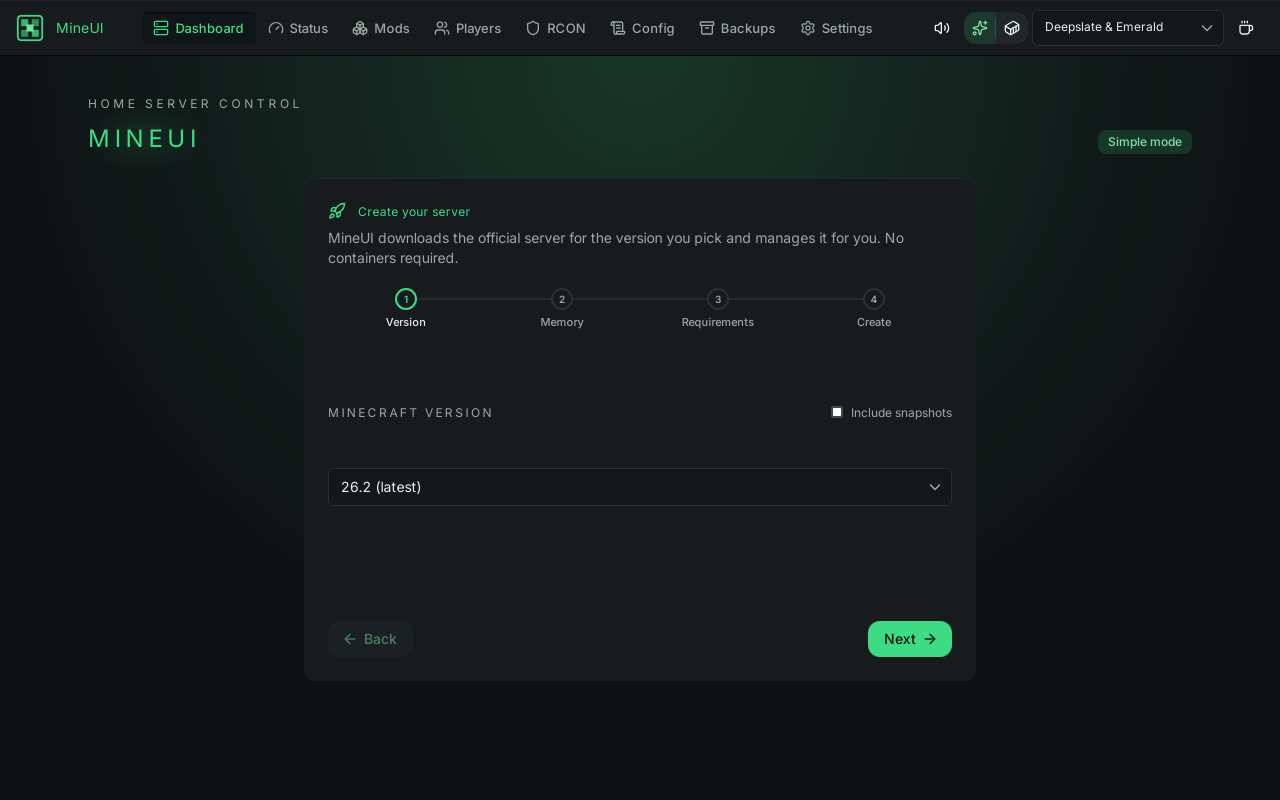
A native desktop app for Minecraft servers - not another web panel. Run a managed vanilla server, create a modded or modpack server in a container, or attach to the Docker or Podman container you already have - several at once. Nothing to self-host. Nothing to secure.
$ chmod +x MineUI_2.12.0_amd64.AppImage && ./MineUI_2.12.0_amd64.AppImage







Open source, measured for real
The Tauri rewrite, in numbers
Your server, one window
Works with what you already run
MineUI doesn't replace your server setup - it attaches to it, or creates a container for you when there isn't one yet. Containers, official jars, and the RCON protocol are supported out of the box; an optional companion mod unlocks deeper metrics.
Not another web panel
Why MineUI?
The usual choices: server.properties in a text editor, a separate RCON client, and docker logs -f - or a self-hosted web panel that's one more service to run and secure. MineUI is a native app that does the job and gets out of the way.
| What you get | MineUI | Web panels (Pterodactyl, Crafty) | Terminal + RCON client |
|---|---|---|---|
Native desktop appNo browser tab, no bundled Chromium | |||
Nothing to self-host or secureNo dashboard service, no exposed HTTP port | |||
Attach to an existing containerDocker or Podman, auto-detected |
Reflects MineUI v2.12.0. Web panels and terminal tooling vary - spotted something unfair? Open an issue.
What ships in MineUI
The Full Toolkit
From process supervision to world backups - everything you'd otherwise juggle across a terminal, an RCON client, and a text editor. Click any feature to see how it works.
Quick Start
From download to a managed server in minutes. No web panel to deploy, no ports to expose.
# Grab the latest release from GitHub
$ chmod +x MineUI_2.12.0_amd64.AppImage && ./MineUI_2.12.0_amd64.AppImage
Simple by default, honest in advanced
Two ways to run it
Simple creates and runs a managed vanilla server for you. Advanced manages a Minecraft server container - one MineUI creates for you, or one you already have. Same dashboard either way, for several servers at once. You choose when you add a server; changing it later lives under Advanced in Server Settings, never while the server is running.
Official jar, verified
MineUI downloads the official server jar from Mojang and verifies its SHA-1 before anything runs.
RCON configured for you
server.properties gets a working RCON setup automatically - no hand-editing, no guessing ports.
Supervised Java process
MineUI launches and supervises the Java process directly. No containers required.
Status without a terminal
The whole server on one screen
TPS, MSPT, players, version, system metrics, and backups - one dashboard, updated live from the running server.
Simulated data, real layout - this is the dashboard MineUI renders for a running server.
Logs stream, nothing polls
Native pipes in Simple mode, runtime logs --follow in Advanced. Lines appear the moment the server prints them.
TPS and MSPT that mean something
20 TPS is the target; MSPT under 50 ms is healthy. Both are on the dashboard next to player count and server version.
Backups built in
World snapshots as .tar.gz - create, list, restore, delete. System metrics cover CPU, memory, and disk, plus network and block IO when attached to a container.
Allowlisted by design
A console that can't hurt you
MineUI's Console page only runs vetted commands - even with raw RCON configured - and shows you which ones are allowed. Anything else is rejected before it touches the server. Click a command to try the mock.
The full allowlist covers day-to-day admin: list · say · whitelist add/remove · op/deop · kick · ban/pardon · time set · weather · difficulty · gamemode · tp · give · save-all · stop. The rejection happens in the app - a bad command never reaches RCON at all.
# Pick a command on the left - output shows up here.
Companion mod · mineui_server_utils v0.2.0
See inside the JVM
A process outside the server can estimate TPS from pings and read container stats. An agent inside the JVM reads the tick loop itself. mineui_server_utils is that agent - a small authenticated HTTP API running in your server.
Real tick-based TPS and MSPT, per-dimension chunk and entity counts, the true loaded-mod list, and cgroup resource usage read straight from /sys/fs/cgroup - no docker or podman CLI needed.
Loopback by default
The API binds 127.0.0.1:8787. Nothing leaves the machine unless you say so.
Token-gated everywhere else
Binding a non-loopback address requires MINEUI_SERVER_UTILS_TOKEN - checked with a constant-time bearer compare - or the mod refuses to start.
Secrets never echoed
rcon.password, rcon.port, and query.port are always stripped from responses.
$ curl http://127.0.0.1:8787/tps
{
  "tps": 19.98,
  "mspt": 42.6,
  "source": "tick-loop"
}Forge 1.20.1 mod or Paper plugin - Spigot, Purpur, Folia, and Bukkit hybrids too. It lives inside the server JVM (JDK 17), not as a standalone jar.
Entirely optional: without it, MineUI falls back to server-list ping plus container and process metrics.
Simple mode, replayed
Watch a server come up
This is what MineUI shows while a managed vanilla server boots - the real log, streamed as it happens, with status and TPS alongside. Scripted replay below; the app streams the real thing.
- First run is handled - official jar downloaded and SHA-1 verified, EULA recorded, RCON configured, then the Java process is launched and supervised.
- Logs are streamed - native pipes in Simple mode,
runtime logs --followin Advanced. No polling anywhere. - Status flips when the server does - the moment “Done” scrolls past, MineUI marks the server Running and starts reading TPS.
Under the hood
Architecture
A native Tauri v2 desktop app: a Next.js 16 static-export UI over a thin #[tauri::command] shell. Everything that matters lives in mineui-core - a pure-Rust crate with no Tauri dependency - and 55 typed IPC commands are the entire contract between the two. No Electron, no bundled Chromium, no local HTTP server. Hover any module to see what it does.
mineui/
Common questions
Frequently asked
Everything you might want to know before pointing MineUI at your server. If something isn't covered here, open an issue on GitHub - we update this list regularly.
Still curious? Open a question and we'll add it.
Free, open, and yours - forever.
MineUI is licensed under AGPL-3.0-only. Run it on your desktop, your laptop, every machine that touches your server - no asterisks. The only commitment we ask back: improvements stay open so the next server admin benefits too.
Every feature, every platform, every release - no paywall, no premium tier, no upsell.
AGPL-3.0-only, with the full source on GitHub. Ship a modified MineUI, even as a hosted service, and the source stays open.
Download it, run it, manage your server. Nothing to sign up for and nothing that expires.
A desktop app, not a hosted panel. No dashboard to self-host, no web port to secure, no middleman between you and your server.
Stop juggling terminals.
Start running your server.
One small native app for Linux, Windows, and macOS. Logs, players, console, backups, and live metrics - no web panel to host, no ports to secure.
v2.12.0 · AppImage · deb · Windows · macOS · Free under AGPL-3.0. No accounts, no subscriptions.